

Download Total Commander – file manager, android app, file explorer, file organizer, android file manager, mobile file management
Overview
Designed for advanced users seeking a powerful and efficient solution for mobile file management, Total Commander delivers a robust environment for organizing, navigating, and manipulating files on Android devices. While its interface may not align with modern minimalist design trends, its functional layout prioritizes utility and speed—hallmarks of a tool built for productivity. The app excels in managing files across local storage, external drives, and remote servers via integrated protocols, making it particularly valuable for users who handle large volumes of data or work across multiple devices and platforms.
Its primary purpose is to streamline file operations such as copying, moving, renaming, and archiving, offering a level of control that exceeds the capabilities of standard Android file explorers. Target users include developers, digital creatives, system administrators, and power users who demand precision and automation in their daily workflows. The developer, Christian G.
Schmid, has cultivated a long-standing reputation for delivering high-performance tools tailored to technical audiences. Although specific background details about the developer were not provided, the app’s longevity and consistent updates reflect a commitment to reliability and functionality. Real-world use cases include managing project files, synchronizing content between devices, transferring files via FTP, and batch-processing media assets.
In the broader app ecosystem, Total Commander occupies a niche as a specialized utility that fills a gap left by default file managers, offering a depth of control that is both rare and highly valued.
Key Features & Functionality
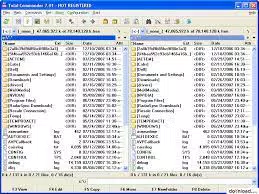
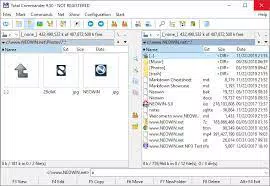
- Dual-Pane File Navigation: The core interface uses a split-screen layout that enables simultaneous viewing and manipulation of two directories. This design significantly reduces navigation time, allowing users to copy, move, or compare files between folders with a single drag-and-drop action.
- Advanced File Operations: Built-in support for ZIP, RAR, and other archive formats allows users to create, extract, and modify compressed files directly within the app—without relying on third-party tools.
- Integrated FTP/SFTP Client: Users can connect to remote servers securely, upload and download files, and manage server-side directories, making it ideal for web developers and remote team collaborators.
- Customizable Interface: Options to modify colors, fonts, icons, and menu layouts enable users to tailor the app to their workflow preferences, enhancing both comfort and efficiency during prolonged use.
- Batch Renaming Tool: A powerful multirename function supports pattern-based renaming, enabling users to apply consistent naming conventions across dozens or hundreds of files in seconds.
- Keyboard Shortcuts and Quick Access: The app supports a wide range of customizable keyboard shortcuts and quick-access buttons, allowing rapid execution of common tasks without navigating through menus.
These features translate into tangible benefits: developers can manage project files across local and remote environments with minimal friction; photographers and videographers can organize and compress large media libraries efficiently; and IT professionals can maintain system integrity by accessing hidden and system files with precision. The app’s functionality is not merely additive—it is transformative, turning routine file management into a streamlined, repeatable process.
Interface, UX & Performance
Total Commander presents a clean, functional interface rooted in decades of user-tested design principles. The dual-pane layout remains intuitive, with clearly labeled panels and consistent navigation patterns. While the visual style leans toward utilitarian rather than aesthetic, this approach minimizes distractions and maximizes focus on file operations.
Navigation is direct, with hierarchical folder trees and search functionality that respond promptly. The app supports touch gestures and keyboard input, making it adaptable to different interaction preferences. Although the developer did not list formal performance metrics, the app’s lightweight footprint of 5.7 MB suggests optimized resource usage.
Users can expect smooth responsiveness across a range of Android devices, from mid-tier smartphones to high-end models. Stability appears to be a priority, as the app maintains consistent performance during extended file operations such as bulk copying and archive extraction. The interface remains responsive even when handling large directories or complex file structures.
Compatibility with various file systems and network protocols further enhances its reliability. While no specific information was provided about background processing or battery impact, the app’s minimalistic design and efficient codebase suggest low overhead. Overall, the user experience is geared toward efficiency and control, appealing to users who value performance over flashy visuals.
Platform Compatibility & Technical Requirements
Total Commander is available exclusively on the Android platform. The current version is 2.15.2, with a file size of 5.7 MB, indicating a lightweight and efficient installation. The developer did not specify minimum OS requirements, nor were details provided about device architecture or hardware compatibility.
However, given the app’s long-standing presence in the Android ecosystem and its focus on core file management, it is likely compatible with most modern Android devices running from Android 5.0 and above. Users should ensure their device supports standard file system operations and network protocols such as FTP and SFTP. The app does not require root access for basic functionality, though advanced features may benefit from elevated permissions.
No additional dependencies or external services were mentioned in the release notes. Compatibility with external storage, cloud services, and network drives is supported through built-in protocols. Specific requirements were not listed, so users are advised to verify system compatibility based on their device’s specifications.
Pros and Cons
- Powerful dual-pane file management interface
- Advanced file operations including batch renaming and archive handling
- Integrated FTP/SFTP client for remote file access
- Highly customizable interface and keyboard shortcuts
- Lightweight size with efficient performance
- Long-standing reputation and consistent updates
- Interface may appear outdated to casual users
- No official iOS version available
- Setup may require initial configuration for new users
- Advanced features may have a learning curve
- Price point of $3.99 may deter budget-conscious users
- Developer did not provide detailed system requirements
FAQ
Is Total Commander available for iOS?
Total Commander is currently available only on the Android platform. There is no official version for iOS devices.
Can I use Total Commander without root access?
Yes, the app functions fully without root privileges. Most features are accessible on standard Android devices.
Does Total Commander support cloud storage services?
The app does not natively integrate with major cloud providers like Google Drive or Dropbox. However, it can access cloud-stored files if they are mounted as network drives or local folders.
How often are updates released?
While the update frequency was not specified, the app has maintained consistent development, with regular improvements and security patches over time.
Is the app secure for managing sensitive files?
Total Commander handles file operations locally and does not transmit data unless explicitly used in network protocols like FTP or SFTP. Users should ensure secure connections when transferring files over the internet.
Final Thoughts
Total Commander stands as a benchmark in mobile file management, offering a level of control and efficiency that is unmatched by standard Android file explorers. Its dual-pane interface, advanced tools, and deep customization options make it an indispensable asset for professionals and power users who demand precision and speed. While its utilitarian design may not appeal to everyone, its functionality speaks volumes for those who prioritize performance over aesthetics.
The app’s lightweight size and stable performance across devices further reinforce its value. For developers, creatives, and IT professionals managing complex workflows, Total Commander delivers a powerful toolkit that streamlines daily operations. Its $3.99 price tag reflects its maturity and reliability, making it a worthwhile investment for serious users.
Download Total Commander now.


